Let's compare three powerful macOS utilities to find the tool that makes your work more efficient. These programs don't just help you run applications, they become a true command center: they speed up your work, simplify everyday tasks, and automate routine processes.
Finding the perfect Mac launcher app is a journey many macOS users undertake. We often need a tool that’s fast, efficient, and versatile enough to handle everything from launching applications and searching files to executing complex workflows.
With numerous options available, choosing the right quick launcher app can be challenging. This comprehensive guide will help you make an informed decision.
Introduction
As our Macs become increasingly loaded with tasks and applications, the need for efficient file search and launcher tools becomes more crucial. Modern Mac productivity utilities have evolved far beyond simple search tools into powerful systems for automating routine tasks on Mac.
Since Spotlight’s introduction in 2004, the world of macOS productivity tools has transformed dramatically. Today’s quick access applications for Mac are no longer just search utilities but comprehensive control centers that enhance the efficiency of power users.
In this article, we’ll compare the three most popular Mac launcher applications: Alfred, Raycast, and Monarch, to help you determine the best productivity tool to optimize your workflow. Which one will become your daily assistant? Let’s find out.
Quick Comparison: Alfred, Raycast, and Monarch
Here’s an overview of key features for a rapid assessment of each tool:
Feature
Alfred
Raycast
Monarch
Base Price
Free (Basic)
Free
Free
Premium Price
$44.99 (One-time)
Pro: $10/month
N/A
Search Speed
Fast
Very Fast
Lightning Fast
Plugin Support
Extensive
Growing
None
Process Automation
Advanced
Basic
None
Memory Usage
Low-Medium
Medium
Very Low
Learning Curve
Steep
Moderate
Minimal
Privacy Focus
High
Medium
Highest
Development Pace
Stable
Rapid
Focused
Alfred: The Swiss Knife of Launchers
Alfred, also known as the best macbook launcher and alternative to Spotlight, was created in 2010 as a collaboration between Andrew (@preppeller) and Vero (@vero) Peppeller from the UK. It was originally made because Andrew was frustrated with the limitations of Spotlight. The tool was named after Batman’s butler, Alfred Pennyworth, who embodies the same spirit of reliable and comprehensive help. What started as a simple utility capable of fast application launching on the Mac has evolved into one of the most respected macOS productivity tools today.
The recognizable personality of this Mac application manager is reflected in the cauldron logo, a design decision that emphasizes both the program’s British origins and its professional nature. Little known fact: the iconic Alfred logo (bowler hat) was inspired by the look of workers in London’s business districts and sketched by Vero on a napkin during a coffee break. The tool gained immense popularity after David Sparks (MacSparky) covered it in 2011.
Under the continued guidance of the Pepperell family, Alfred remains the leading Mac automation application and fast file search program, continuously evolving and improving for over a decade as a universal helper for macOS.
Alfred Screenshot
What you can do with Alfred
Basic Features
Instantly find and run any application or file you want.
Perform calculations right in the search bar
Search the web with your favorite search engines
Control your Mac system (shutdown, reboot, lock)
Use the dictionary and spell checker.
Convert currencies and units of measure
Manage music and podcasts
Quick access to notes
Check weather and schedules
Powerpack features
Smart file handling:
Move and copy files between folders without Finder
Select multiple files for batch operations
Create bookmarks for frequent locations
View file contents without opening them
Quickly archive and unzip files
Advanced Clipboard:
Keep a history of everything you’ve copied
Save text, images, files
Create snippets for frequent use
Synchronize the clipboard between different Macs
Search through clipboard history
Powerful Workflows:
Automate routine tasks
Create complex action scripts
Integrate with any application or service
Use ready-made workflows from the community
Share your workflow with others
Usage Examples
For workflow
Quickly search workflow documents and projects
Automate sending reports and emails
Manage tasks and calendar
Quick access to important folders and files
For Development
Search documentation and Stack Overflow
Manage git repositories
Running servers and Docker containers
Generate test data
For Creativity
Organizing media files and projects
Working with color palettes
Quick access to assemblies
Convert file formats
Benefits of Alfred
Powerful Workflows system
Create complex automations without programming
Use thousands of ready-made solutions from the community
Combine activities in a visual editor
Share your workflows with others
Customize for any workflow
Privacy and independence
Works completely offline without the cloud
One-time purchase instead of subscription
No account registration required
Stores all data locally only
Doesn’t track what you do
Time-tested quality
Over 13 years of continuous development
Huge active community
Stable, glitch-free operation
Timely updates to new macOS
Responsive support from developers
Raycast: A modern contender
Raycast emerged in 2020 thanks to a team of former Facebook engineers led by Thomas Paul Mann (@thomaspaulmann) and Peter Nikolaev (@pitnikola), who had firsthand knowledge of the productivity challenges at large tech companies.
The name of the tool was inspired by the concept of “throwing rays of light through the darkness” - illuminating the fastest path to any action on your Mac. What makes Raycast unique is that it was developed entirely during the COVID-19 pandemic, with the team working remotely on three continents.
An interesting detail: the first version was created as an internal tool for the Facebook team’s own use before they decided to turn it into a product. The brand’s signature purple color was chosen after UI design research showed it had the highest correlation with perceived speed of the app.
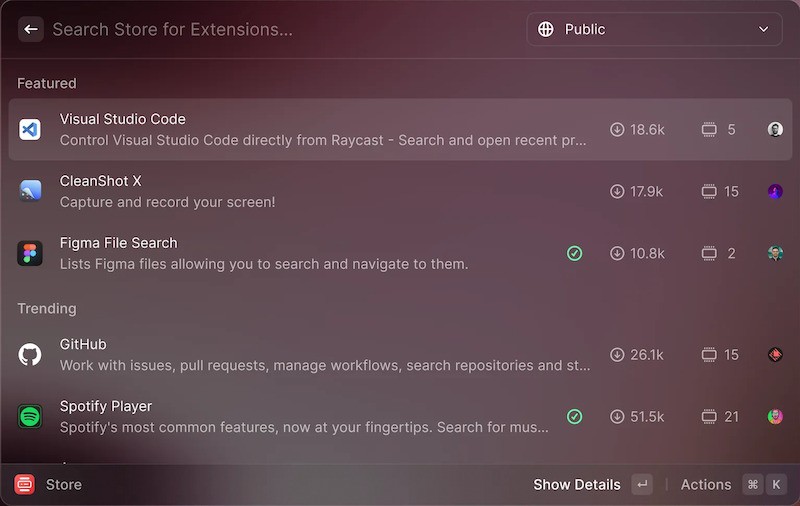
Raycast Screenshot
What you can do with Raycast
Smart Search and Launch
Instantly find and launch applications
Search documents and files by content
Quickly switch between open windows
Access recent files
Search system settings
Manage windows
Split the screen into parts with a single command
Move windows between monitors
Center and resize windows
Create your own window layouts
Save favorite window positions
System Control
Control brightness and sound
Control Bluetooth devices
Connect to Wi-Fi networks
Clear memory and cache
Manage focus and notifications
Built-in tools
Value and currency converter
Calculator with calculation history
Spell checker
Date and time management
Password generator
Word Processing
Various text transformations
Encoding and decoding (Base64, URL)
Character and word counting
Work with JSON and XML
Generating Lorem Ipsum
Productivity
Create quick notes
Setting timers and reminders
Clipboard management
Creating snippets
Quick access to emoji
Service integrations
GitHub: view repositories and issues
Calendar: view events
Contacts: Quickly search for contacts
Music: control playback
Browser: search bookmarks
Features of the Pro version
Work with Artificial Intelligence:
Generate and edit texts
Analyze code and get explanations
Create images via DALL-E
Get quick answers to questions
Format and improve content
Advanced Automation:
Create custom teams in different languages
Integrate with any API
Customize complex action scripts
Automate routine tasks
Create custom tools
Collaborate:
Share teams with colleagues
Synchronize settings
Use common snippets
Create corporate extensions
Manage access to commands
Usage Examples
For developers
Quick access to GitHub repositories
Manage pull-requests
Search through documentation
Working with various APIs
Launch dev environments
For designers
Instant access to Figma files
Working with colors and gradients
Optimize images
Format conversion
Asset management
For managers
Create tasks in JIRA
Managing statuses in Slack
Scheduling in Calendar
Quick notes in Notion
Timekeeping
Benefits of Raycast
Modern interface:
Minimalistic design
Fast animations
Dark and light themes
Adaptive interface
High Performance:
Instant startup
Fast search
Low resource consumption
Stable performance
Continuous development:
Regular updates
New features
Performance improvements
Support for new services
Monarch: Speed Demon
Monarch, released in 2022, is a revolutionary launcher app for macOS that has quickly gained recognition for its exceptional speed and thoughtful design. Developed by Michael Lowe (@mikegpt) as a passion project, Monarch represents a new philosophy in app launcher, combining cutting-edge technology with user-centered design principles.
The name of the app, inspired by the efficient migratory movement of the Monarch butterfly, perfectly reflects its core focus on speed and efficiency. A distinctive feature of Monarch is its use of the Rust programming language, making it one of the first mainstream macOS utilities built on this technology. This choice greatly enhances the performance of the application.
Since its launch, Monarch has continued to evolve with regular updates and improvements based on user feedback, solidifying its position as the leading launcher app for macOS users.
Monarch Screenshot
What you can do with Monarch
Quickly launch and search
Instantly find and launch applications
Search files at lightning speed
Search by file content
View recent documents
Find hidden system files
Smart File Management
Quickly navigate between folders
View file contents without opening them
Perform basic file operations
Open related files and folders
Use smart tags to organize
System Operations
Manage system settings
Run basic macOS commands
Quickly get system information
Monitor running processes
Manage application windows
Usage Examples
For everyday tasks
Quick access to applications
Search for documents
Navigate the file system
Manage files and folders
For work
Organize work files
Quick access to projects
Search work documents
Workspace management
For Development
Search source code
Quick access to projects
Navigation through the project structure
Working with configuration files
The main advantages of Monarch
Unrivaled speed
Instant startup and response time
Lightning-fast file search
No lag time
Optimized indexing
Minimal resource consumption
Simplicity and minimalism
Intuitive interface
Focus only on important functions
No unnecessary settings
Fast learning curve
Clean and modern design
Honesty and transparency
Free to use
No hidden fees
Open development
Independent development
Focus on user privacy
Performance Comparison
Important Note: Actual performance may vary significantly depending on:
The configuration of your computer
The number of indexed files
Extensions installed
Version of macOS / Windows
Version of the application
First Launch Speed
Monarch exhibits an impressive startup speed of about 0.3 seconds, making it one of the most responsive tools in its category. This is especially noticeable on first startup after a system reboot. However, it’s worth noting that Monarch is less common than its competitors, so its performance may vary depending on system configuration.
Raycast launches in about 0.5 seconds, showing excellent results for an application with this functionality. Startup time may increase depending on the number of extensions installed and user settings. Users note that even with a large number of plugins, Raycast maintains an acceptable startup speed due to the optimized extension loading system.
Alfred, despite a slightly longer startup time of about 0.7 seconds, makes up for it with exceptional stability and high speed of tasks after loading. Its carefully optimized indexing and search algorithms provide fast data access, and startup time remains stable regardless of the number of active Workflows.
Memory Consumption
Monarch demonstrates impressive efficiency with a base consumption of about 80 MB, making it the lightest among its competitors. Thanks to its optimized architecture, Monarch maintains stable memory consumption without noticeable spikes even during long periods of operation. This is especially valuable for MacBook Air users or older Macs with limited resources.
Raycast, on the other hand, consumes more memory, ranging from 120MB to 180MB in the base configuration. This higher consumption is due to its advanced functionality and modern architecture. Consumption may increase when extensions are actively used, but Raycast compensates for this with smart memory management and the ability to replace several individual applications. Raycast runs especially efficiently on Macs with Apple Silicon, where its modern architecture is on full display.
Alfred occupies an intermediate position with 80-120 MB of memory consumption. Years of development and optimization have resulted in an efficient resource management system where even complex Workflows have minimal impact on overall memory consumption. Alfred is characterized by stable performance in long-term use and offers options for fine-tuning the use of system resources.
CPU Utilization
Monarch again shows exceptional efficiency in CPU utilization. It consumes less than 1% of CPU time in standby mode, with small peaks of up to 2-3% when actively searching. This cost-efficiency makes it an ideal choice for users concerned about battery life on their MacBooks. Monarch quickly returns to minimal resource consumption once search operations are complete.
Raycast has a slightly higher baseline consumption of 1-2% in standby mode. When working with artificial intelligence or complex plugins, the load may temporarily increase, but the modern architecture of the application ensures efficient load balancing between processor cores. Raycast is particularly well optimized for running on modern Macs, where it can take full advantage of multi-threading.
Alfred also shows a baseline consumption of about 1-2% of CPU time, but is exceptionally stable even when performing complex operations. Its optimized search algorithms and efficient Workflow handling ensure predictable load on the system. Years of development experience have resulted in a robust resource management system that minimizes the impact on overall Mac performance.
Practical conclusions
When choosing a launcher, it is worth considering the specifics of your use and the capabilities of your computer. If your priority is to save resources as much as possible, Monarch will be the best choice. For users who need advanced functionality and are ready to allocate additional resources for it, Raycast will offer the most complete set of modern features. Alfred is the middle ground, offering a time-tested balance between functionality and resource consumption.
Performance Features
Monarch
Optimized for instant startup
Minimal resource consumption
Stable operation without memory accumulation
Efficient file indexing
Raycast
Modern engine with optimized code
Smart memory management for extensions
Ability to disable unused features
Regular performance optimizations
Alfred
Time-tested code
Efficient caching system
Optimized Workflow
Stable resource consumption
Optimization tips
For Monarch:
Limit the number of indexed folders
Regularly update the index
For Raycast:
Disable unused extensions
Limit the number of active plugins
For Alfred:
Optimize complex Workflow
Clear cache regularly
Choose a macOS launcher
Consider these factors
Complexity of Workflow:
Simple startup: Monarch
Moderate automation: Raycast
Complex workflows: Alfred
Budget Considerations:
No budget: Monarch or Raycast free
One-time investment: Alfred
Subscription-friendly: Raycast Pro.
Technical expertise:
Beginner: Monarch
Advanced: Raycast
Expert: Alfred
Tips for getting started
Start with basic functionality
Gradually learn advanced features
Join community forums
Watch tutorial videos
Practice keyboard shortcuts
General mistakes to avoid
Initially overloading yourself with too many features